# HTTP Request

## UI 소개

{% tabs %}
{% tab title="자동화" %}

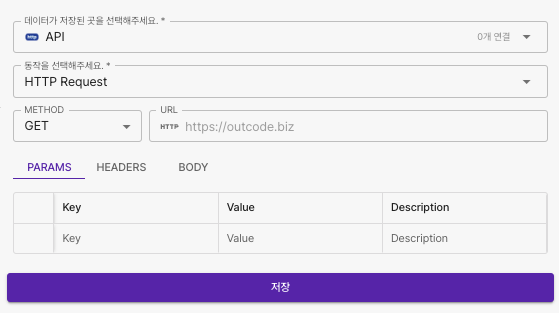
<figure><img src="https://1362923181-files.gitbook.io/~/files/v0/b/gitbook-x-prod.appspot.com/o/spaces%2F5PH5ktGI0BWG6g9fvtcn%2Fuploads%2FDYMnHDMbTy6GgwiZQxJO%2FScreenshot%200006-12-03%20at%205.12.42%E2%80%AFPM.png?alt=media&#x26;token=36b64334-2e5f-428a-b223-8f7333e16619" alt="" width="419"><figcaption></figcaption></figure>
{% endtab %}

{% tab title="데이터플로우" %}

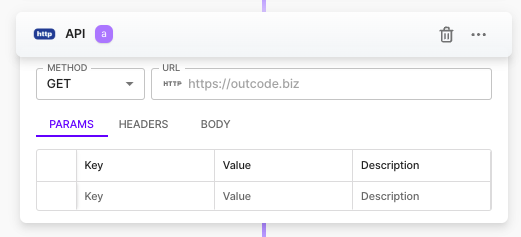
<figure><img src="https://1362923181-files.gitbook.io/~/files/v0/b/gitbook-x-prod.appspot.com/o/spaces%2F5PH5ktGI0BWG6g9fvtcn%2Fuploads%2FWsSnReE1FqE6Zqmviqjs%2FScreenshot%200006-12-03%20at%205.13.00%E2%80%AFPM.png?alt=media&#x26;token=c966dfd9-fa2b-48ef-af17-1469bc94885c" alt=""><figcaption></figcaption></figure>
{% endtab %}
{% endtabs %}

<table><thead><tr><th width="137" align="center">항목명</th><th width="292" align="center">항목소개</th><th align="center">비고</th></tr></thead><tbody><tr><td align="center">METHOD</td><td align="center">API 의 Http Method</td><td align="center">GET, POST, PUT, DELETE, PATCH<br>HEAD, OPTIONS </td></tr><tr><td align="center">URL</td><td align="center">호출하고자 하는 API 주소</td><td align="center">완전한 URL 주소 입력<br>예) https://api.outcode.biz/endpoint</td></tr><tr><td align="center">PARAMS</td><td align="center">URL 끝에 추가되는 키(Key)와 값(Value) 의 조합<br>예) key=value </td><td align="center">파라미터가 포함된 URL 주소를 붙여넣었다면 자동완성됨<br>예) https://api.outcode.biz/endpoint?name=outcode</td></tr><tr><td align="center">HEADERS</td><td align="center">인증, 데이터 요청 방식을 서버에 알리는 역할을 하는 키(Key)와 값(Value)의 쌍인 메타데이터</td><td align="center">API 에서 별도의 요청 헤더 항목이 있다면 필수 입력<br>예) Content-Type (Key) <br>application/json (Value) </td></tr><tr><td align="center">BODY</td><td align="center">서버로 전송되는 실제 데이터로 생성, 수정 목적의 API 호출시 사용</td><td align="center">예) { "name" : "outcode" } </td></tr></tbody></table>

***

## 실행 결과&#x20;

실행결과로 산출된 데이터는 사용하시는 API 를 제공하는 공급 업체의 문서를 참조하세요.
