# 데이터 삭제

## UI 소개

{% tabs %}
{% tab title="데이터플로우" %}

<figure><img src="https://1362923181-files.gitbook.io/~/files/v0/b/gitbook-x-prod.appspot.com/o/spaces%2F5PH5ktGI0BWG6g9fvtcn%2Fuploads%2FYeV5LSjw6hl5VrWOGqmv%2FScreenshot%200006-12-04%20at%205.29.50%E2%80%AFPM.png?alt=media&#x26;token=776e3fd3-9de6-4aec-8f60-bf2edfa59052" alt=""><figcaption></figcaption></figure>
{% endtab %}

{% tab title="참조 URL 확인" %}

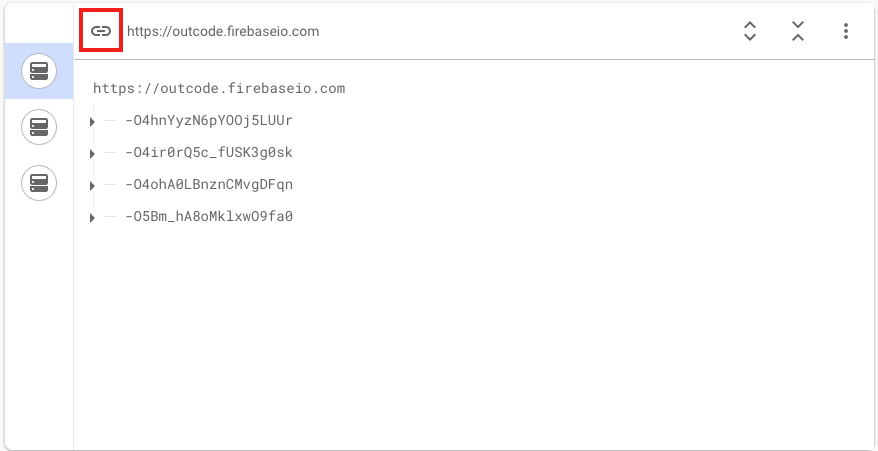
1. Realtime Database에서 액션 수행을 원하는 데이터베이스와 경로를 직접 지정합니다.&#x20;
2. 원하는 경로를 찾으셨다면 데이터베이스 주소 왼쪽의 클립 버튼을 눌러 복사한 뒤 그대로 붙여넣으세요.&#x20;

<figure><img src="https://1362923181-files.gitbook.io/~/files/v0/b/gitbook-x-prod.appspot.com/o/spaces%2F5PH5ktGI0BWG6g9fvtcn%2Fuploads%2F4SK1yCo0igjyaIeHC8SV%2FScreenshot%200006-12-04%20at%205.35.49%E2%80%AFPM.png?alt=media&#x26;token=3d8783d2-1d2f-4297-a3bc-d200de7a2459" alt=""><figcaption></figcaption></figure>
{% endtab %}
{% endtabs %}

<table><thead><tr><th width="137" align="center">항목명</th><th width="292" align="center">항목소개</th><th align="center">비고</th></tr></thead><tbody><tr><td align="center">참조 URL</td><td align="center">삭제할 데이터 경로</td><td align="center">참조 URL 확인 탭 참조</td></tr></tbody></table>

***

## 주의사항

* 데이터를 삭제할 경우 다시 되돌릴 수 없습니다.
* 유효한 경로인지 확인해 주세요.